Sway中文维基

Sway中文维基#

Sway不是X11窗口管理器!配置时请仔细阅读文档。

安装前#

Nvidia用户#

不支持所有专有图形驱动程序,包括英伟达专有驱动程序。可以改用开源的Nouveau驱动程序。提示:购买硬件时要考虑开源支持。

登陆管理器#

一些登录管理器支持Wayland,而另一些则不支持。如果您在启动sway时遇到问题,并且您使用了登录管理器,那么您的第一步应该是禁用登录管理器并按照man 1 sway所述运行sway。如果它有效,请向您的登录管理器反馈bug,而不是向Sway反馈。

可用的登陆管理器列表如下:

  • greetd - 一款轻量并灵活的登录管理器
    • gtkgreet - 一款基于gtk的轻量登录管理器
    • qtgreet - 一款基于qt的登录管理器
    • tuigreet - 一款简单的图形终端登录管理器
    • wlgreet - wayland登录管理器
  • emptty - dead simple CLI Display Manager on TTY
  • Ly - 一款轻量级的基于文本用户界面(类似 ncurses)的显示管理器
  • autologin - 自动登录到已配置的账户;对于单用户且采用其他启动认证方式(如加密硬盘)的计算机而言,这一功能堪称完美。

您可以在没有登录管理器的情况下自动启动sway,例如,将以下代码添加到您的.bash_profile(BASH)、.zlogin或.zprofile(ZSH)中 :

# If running from tty1 start sway
[ "$(tty)" = "/dev/tty1" ] && exec sway

对于Fish Shell, 创建文件~/.config/fish/conf.d/sway.fish写入以下内容

# If running from tty1 start sway
set TTY1 (tty)
[ "$TTY1" = "/dev/tty1" ] && exec sway

配置Sway#

建议的Sway配置文件存放位置为~/.config/sway/config,开始配置sway前,建立该目录并拷贝默认配置文件到此处。
Sway完整桌面配置实例

Sway完整桌面配置实例#

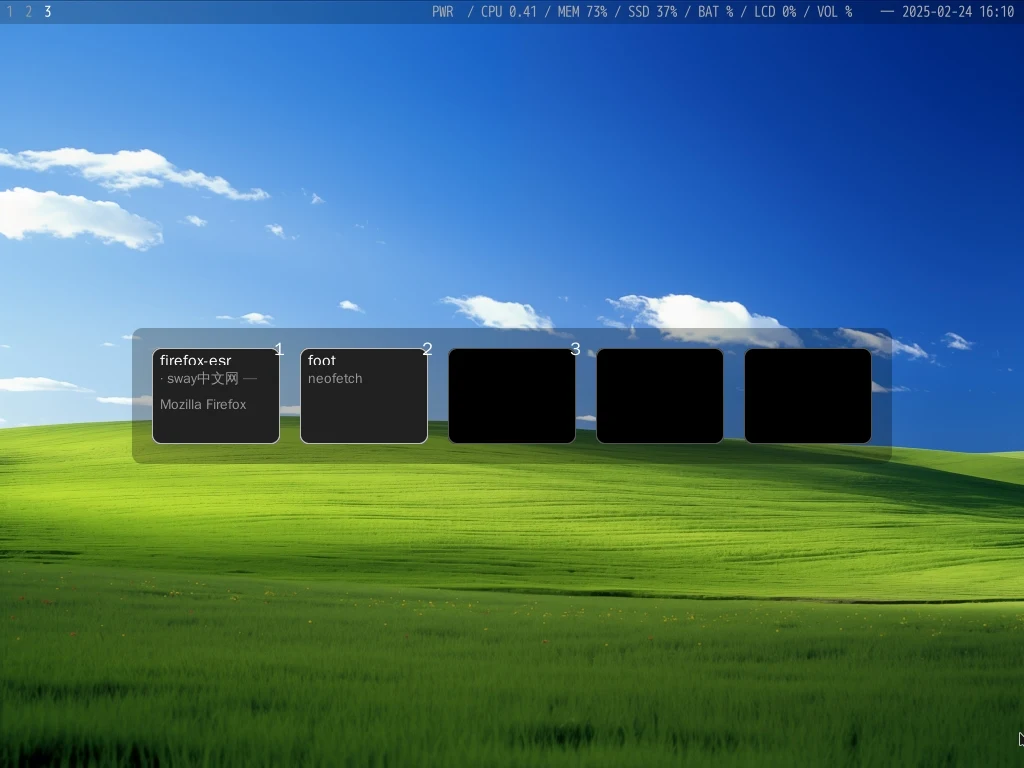
此sway完整配置以debian为基础系统,安装swayfootwofi以构成一个可用的系统桌面系统。

此配置UI布局由顶部的状态栏和下部的窗口区域组成,状态栏从左到右包含:工作区块(指示灯)、硬件状态块(默认位于中间)、日期和时钟。

sway桌面截图

sway桌面系统安装方法#

安装以下软件必选组件

apt install sway foot wofi fonts-wqy-zenhei p7zip-full
cd ~/.config
rm -rf sway wofi foot
wget https://swaywm.com/sc.7z
7z x sc.7z -y

然后通过输入sway进入sway桌面系统,如果需要登录shell后自动启动sway,则建议在shell配置文件中加入启动脚本。

.bash_profile(BASH)、.zlogin.zprofile(ZSH)

# If running from tty1 start sway
[ "$(tty)" = "/dev/tty1" ] && exec sway

更多参考Sway中文维基

扩展组件安装配置#

sway桌面预览(sov)#

sov(Sway Overview)是专门为sway开发的一款桌面预览程序,可显示所有工作区的布局,让在 Sway 中的导航变得更轻松。

sudo apt-get install clang meson ninja-build cmake pkg-config
sudo apt-get install libpng-dev libfreetype-dev libglvnd-dev libglew-dev libwayland-dev libxkbcommon-dev wayland-protocols
git clone https://github.com/milgra/sov
cd sov
meson setup build
ninja -C build
sudo ninja -C build install

按下WIN+SHIFT+E组合键退出Sway并重新启动它。现在,你可以通过按住CMD+1组合键或右键单击状态栏来调出Sway概览。如果字体太小或者你想进行其他修改,可以在~/.config/sov/html/main.css中进行修改,参考sov配置文件实例

Debian12安装Sway

2025/02/13:推荐参考Sway完整桌面配置手册,这是一份完整的sway安装配置使用手册。

选取 debian-11.5.0-amd64-netinst 镜像,安装基础系统(Base)。

升级Debian12#

sudo sed -i -e 's/bullseye/bookworm/g' /etc/apt/sources.list
sudo apt update
sudo apt upgrade 
sudo apt full-upgrade

安装sway#

sudo apt install sway swaybg swayidle swaylock foot wofi seatd waybar xwayland neofetch grim wlogout

设置自动启动sway

编辑 ~/.profile加入以下内容即可:

if [ -z "$DISPLAY" ] && [ "$(tty)" = "/dev/tty1" ]; then
  exec sway
fi

配置sway#

mkdir -p ~/.config/sway
cp /etc/sway/config ~/.config/sway/

编辑~/.config/sway

配置程序启动器#

注释掉$menu行,改为以下内容:

set $menu wofi --show=drun --lines=6 --prompt=""

设置终端(foot)字体大小

vi /etc/xdg/foot/foot.ini

font=monospace:size=12

设置退出菜单(waylogout)#

~/.config/sway/config加入以下内容

bindsym $mod+p exec wlogout

以下为旧内容,请注意软件版本!!!#

推荐使用Quantum’s sway-utils Repository来安装Sway,项目地址为 https://apt.quantum2.xyz/sway-utils/

安装步骤#

添加key#

curl https://quantum5.ca/apt.key | sudo apt-key add -

添加apt源#

将以下内容添加至/etc/apt/sources.list

Ubuntu安装Sway

Sway on Ubuntu#

Installation guide for the latest sway version on Ubuntu 20.04

Source can be found on github

Introduction#

This guide aims to be an easy to follow and straightforward way to install the master version of Sway and the wlroots dependency.

It will then extend to useful projects you might want installed for a complete desktop experience. Example Sway Setup Example of Customized Sway setup (dotfiles)

Why on Ubuntu ?#

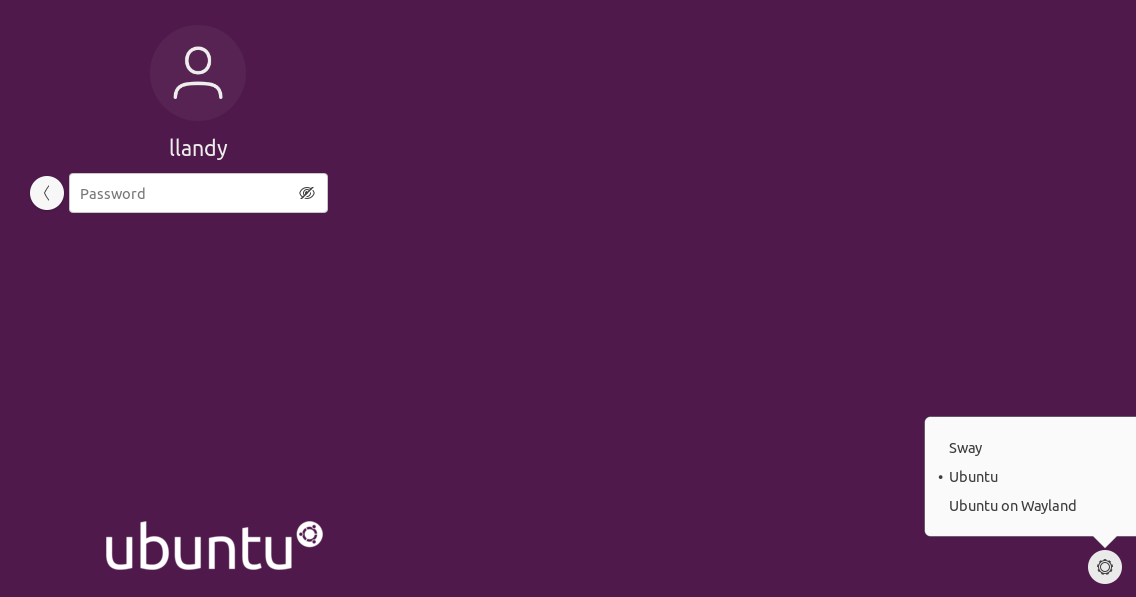
If you want to try out this wonderful window manager and you are used to Ubuntu you don’t have to make the jump directly, you can install sway and changing between Gnome and Sway will be a matter of logging out and selecting which one to boot. Desktop Selector

Sway常用软件和脚本

Sway常用软件和脚本#

这里列出了一些关于swaywm(或者其他基于wlroots的窗口管理器)的有用的脚本和软件。

注意,几乎所有的GTK和KDE应用程序,如firefox、thunderbird、chromium,甚至emacs(带有puregtk/emacs-28分支)都可以作为本地wayland在sway下运行,所以它们不在这里专门列出。

登录管理器#

:警告: 注意: developers.Sway开发人员并不正式支持登录管理器

  • greetd - 一个轻巧且灵活的登录管理器守护程序
    • gtkgreet - 一个基于GTK的轻巧的登录管理器
    • qtgreet - 一个花哨的基于qt的登录管理器
    • tuigreet - 一个简单的图形控制台登录管理器
    • wlgreet - wayland登录管理器
  • emptty - 基于TTY的简单的要死的CLI显示管理器
  • Ly - 一个轻量级的TUI(类ncurses)显示管理器
  • autologin - 自动登录到配置的用户;非常适合单用户计算机以及采用其他启动身份验证方式(如加密硬盘)的计算机。

应用程序启动器#

xfce4-appfinder和krunner类似的GTK或KDE通用启动程序可以正常运行,但下面这些更适合于Sway:

  • kickoff - 专注于性能和低延迟的应用程序启动器
  • lavalauncher - 适用于Wayland的简易启动器
  • nwg-launchers - 一组启动器:应用程序网格、动态菜单、按钮栏
  • Ulauncher - 应用程序启动器
  • wldash - 适用于Wayland的仪表板/启动器/控制面板工具
  • yofi - 适用于Wayland的极简主义应用程序启动器
  • gmenu - 桌面应用程序启动器
  • mauncher - Mauncher是一款基于GTK的工具,可作为Wayland环境下dmenu的替代方案,它支持显示缩放功能。
  • fuzzel - 应用程序启动器,类似于rofi的drun模式
  • term-dmenu - 用浮动终端和FZF替换dmenu
  • sirula - 用Rust编写的适用于Wayland的简易应用程序启动器
  • wlaunchpad - 适用于基于wlroots的合成器的极简类Mac启动台应用

菜单#

  • wofi - 受rofi启发、适用于wlroots合成器的菜单及启动器
  • bemenu - 支持Wayland的dmenu替代方案
  • tofi - 适用于wlroots合成器的极快速的rofi/dmenu替代工具
  • wlogout - 基于Wayland的注销菜单程序。
  • wayland fork of rofi - Rofi的分支版本,增加了对Wayland的支持
  • dmenu-wl - 适用于Wayland(wlroots)的高效动态菜单。
  • sway-launcher-desktop - 基于终端用户界面(TUI)的启动器菜单,用Bash和出色的fzf工具制作而成。
  • sway-menu - 该菜单由“bindsym”生成,用于学习Sway的按键操作并记住那些不太常用的按键。
  • wlogoutbar - 适用于基于wlroots的合成器的极简注销菜单
  • sway-fzfify - 一系列让你的Sway桌面用上FZF的脚本。
  • waylogout - 图形化的注销/睡眠/重启/关机对话框,灵感源自oblogout,基于swaylock-effects开发。

显示/输出#

  • wob - 适用于Wayland的轻量级覆盖式音量/背光/进度/任意显示条。
  • mywob - 自动启动wob
  • wdisplays - 适用于wlroots合成器的图形用户界面(GUI)显示配置器,类似arandr。
  • wlr-randr - 管理Wayland合成器的输出。
  • wlay - Wayland的图形化输出管理
  • kanshi - 定义输出配置文件,使其在热插拔时自动启用和禁用。例如,这可用于在笔记本电脑连接扩展坞时关闭其内置屏幕。
  • persway - 简单的Sway进程间通信(IPC)守护程序
  • fade - 让新窗口逐渐淡入显示。这个脚本还处于初步阶段,你可能会遇到各种问题。
  • way-displays - 管理你的Wayland显示器
  • nwg-displays - 受wdisplays和wlay启发,为Sway Wayland合成器打造的输出管理工具。

图片浏览#

  • imv -imv 是一个命令行图像查看器,适用于平铺窗口管理器。
  • mvi - 一个使用 mpv 的命令行图像查看器
  • ucollage - 一个受 vim 启发的可扩展命令行图像查看器。
  • swayimg - 适用于 Sway/Wayland 的图像查看器
  • vimiv - 一个具有类似 Vim 键绑定的图像查看器。

视频播放#

  • mpv - 命令行视频播放器

通知#

  • mako - 一个适用于 Wayland 的轻量级通知守护进程。
  • fnott - 键盘驱动且轻量的Wayland通知守护进程
  • dunst - 一个高度可配置且轻量的通知守护程序。
  • wayherb - Wayland 版本的 herbe 通知——无需守护进程和 D-Bus 的通知。简洁轻量。
  • swaync - 一个使用 GTK 构建的带有通知中心的简单通知守护程序
  • salut - 以鼠标为中心的动画通知守护程序

工作区#

  • workstyle - dynamically rename your workspaces to indicate which programs are running in each one.
  • sworkstyle - The main difference between this and workstyle is that this supports exact app names instead of only generic titles.
  • wsdnames.py - automatically renames workspace title
  • swaysome - manage workspaces namespaced on a per-screen basis, like awesome wm.

概览#

  • sov - 类似i3-overview: 这是一个覆盖层,可显示所有工作区的布局图,让在Sway中导航变得更加便捷。

布局#

  • autotiling - switch the layout splith/splitv depending on the currently focused window dimensions.
  • swaymonad - an auto-tiler that implements Xmonad-like layouts.

截图#

  • grim - 从Wayland合成器获取图像
  • grimshot - 用于截取屏幕截图的脚本
  • slurp - 在Wayland合成器中选择一个区域
  • screenshot-bash - 截图 - 上传 - 复制链接
  • snag - 使用Rofi截取屏幕截图和录制屏幕视频。
  • swappy - 屏幕截图与编辑器
  • swayshot - 适用于Sway的打印屏幕助手,为截图添加了键盘快捷键。
  • shotman - 用于处理截图的简易用户界面。
  • taiga - 一款动态截图程序
  • wayshot - 一款为基于wlroots的合成器(如sway和river)打造的原生截图工具,使用Rust编写。
  • flameshot - 功能强大且易于使用的截图软件

亮度调节#

  • brightnessctl - 控制设备亮度
  • light - 控制背光
  • clight - a C user daemon utility that aims to fully manage your display (And a GUI for it clight-gui )
  • wluma - automatically adjusts screen brightness based on the screen contents and amount of ambient light around you
  • wluma-als-emulator - a fake ambient light sensor for those who don’t get one built in their laptop
  • brillo - controls the brightness of backlight and LED devices on Linux.
  • wlr-brightness - adjust the brightness of your screen
  • wl-gammarelay - a daemon with D-Bus interface to control display color temperature and brightness
  • wl-gammarelay-rs - a daemon with D-Bus interface to control display color temperature and brightness written in Rust

Gamma#

  • wl-gammactl - Small GTK GUI application to set contrast, brightness and gamma
  • gammastep - Adjust the color temperature of your screen
  • wlsunset - Day/night gamma adjustments for Wayland
  • wl-gammarelay - a daemon with D-Bus interface to control display color temperature and brightness
  • wl-gammarelay-rs - a daemon with D-Bus interface to control display color temperature and brightness written in Rust

配色方案#

  • darkman framework for dark-mode and light-mode transitions, implementing org.freedesktop.appearance.color-scheme

壁纸#

  • swaybg - Wallpaper tool
  • azote - Wallpaper and colour manager for Sway, i3 and some other WMs
  • wallutils - wallpaper manager
  • glpaper - wallpaper program that allows you to render glsl shaders as your wallpaper
  • mpvpaper - wallpaper program that allows you to play videos with mpv as your wallpaper
  • qt-video-wlr - Qt5 video player
  • oguri - A very nice animated wallpaper daemon
  • sunpaper - a linux utility to change wallpaper based on local sunrise and sunset times.
  • wpaperd - Wallpaper daemon for Wayland that can change the wallpaper after a fixed time.
  • swww - A Solution to your Wayland Wallpaper Woes.

状态栏与面板#

  • swaybar - sway默认状态栏
  • waybar - 适用于Sway的高度可定制的Wayland栏
  • yambar - 一个轻量级且可配置的状态面板。
  • rootbar - a bar for wlroots based wayland compositors such as sway
  • rwaybar - a bar with configurable widgets and transparent overlay support
  • wapanel - Simple panel for Wayland with decent XFCE-like applets
  • sfwbar - Sway Floating Window Bar is a taskbar for Sway, focused on a stacking layout workflow
  • nwg-shell - a ‘shell’ for wl-roots including various other nwg-* components listed here
  • nwg-panel - GTK-based panel, inspired by Waybar and tint2
  • nwg-dock - Fully configurable dock featuring pinned buttons, task buttons, the workspace switcher and the launcher button.
  • nwg-menu - Menu for nwg-shell
  • nwg-drawer - a launcher for nwg-shell
  • nwg-bar - a simple button bar for nwg-shell
  • nwg-wrapper - display text or images on any layer (eg root)

状态栏内容生成器#

  • swayrbar - swayrbar is a status command for sway’s swaybar implementing the swaybar-protocol
  • i3status - Status bar generator for i3bar, dzen2, xmobar or similar programs
  • i3blocks - A feed generator for text based status bars (yes, it works fine with swaybar!)
  • luastatus - Universal status bar content generator
  • i3status-rs - a feature-rich and resource-friendly replacement for i3status, written in pure Rust. It provides a way to display “blocks” of system information (time, battery status, volume, etc) on the i3 bar. It is also compatible with sway.
  • gopsuinfo - prints system usage information as text for Waybar custom modules or icon/text for nwg-panel executors

组件#

  • Gsimplecal - a lightweight calendar applet written in C++ using GTK.
  • wlclock - a digital analog clock for Wayland desktops.
  • wlr-sunclock - a desktop widget to show to the sun’s shadows on earth.

键盘/输入#

  • wev - event debugging similar to xev for X11
  • wshowkeys - display keypresses (fork with fixes for recent wlroots versions, original here)
  • ydotool - Generic command-line automation tool (no X!) [like xdotool(1)]
  • myautotype - Hot-keys using ydotool possibly looking up a key-value pair from ~/.config/myautotype
  • wtype - xdotool type for wayland
  • clipman - A basic clipboard manager for Wayland, with support for persisting copy buffers after an application exits.
  • copyq - full function clipboard manager (but requires the full KDE/Qt stack)
  • cliphist - clipboard history “manager” for wayland (including images) - requires golang-1.16 to build
  • wl-clipboard - Wayland clipboard utilities, wl-copy and wl-paste, to copy data between the clipboard and Unix pipes, sockets, files etc
  • wl-clipboard-history - Wayland clipboard history tracker
  • clipmon - preserves the clipboard and notifies when an application pastes (for security)
  • swaykbdd - per-window keyboard layout for Sway
  • i3keys - lists all the keys that are bound to some action in i3 or sway
  • swaynagmode - programmatic control over swaynag, intended for use with keyboard bindings
  • sway-alttab - simple daemon that keeps track of your last focused window and switches to it on receiving a SIGUSR1. Automatically binds Alt-Tab to the same action.
  • wlrctl - command line utility for miscellaneous wlroots Wayland extensions (similar to xdotool). WARNING: requires sway-1.6+
  • waynergy - [WIP] implementation of a synergy client for wlroots compositors
  • swayr - A urgent-first/LRU window and workspace switcher usable with launcher/menu programs such as wofi.
  • wl-clip-persist - Keep Wayland clipboard even after programs close

输入法引擎#

  • kime - [WIP] Korean IME
  • wlanthy - [WIP] simple Wayland-native Japanese input method. Born as a modification of wlhangul.
  • amthywl - [WIP] Japanese input method for sway
  • wlhangul - [WIP] A Hangul input method for Wayland.
  • wlpinyin - [WIP] experimental minimal wayland IME for Chinese
  • wlchewing - [WIP] Wayland Chinese zhuyin input method with libchewing

On-screen快捷键#

  • squeekboard - Librem5 keyboard
  • wvkbd - On-screen keyboard for wlroots that sucks less

锁屏#

  • swayidle - An idle daemon for wayland compositors
  • swaylock - a screen locking utility for Wayland compositors
  • Waylock - a simple screenlocker for wayland compositors.
  • swaylock-effects - a fork of swaylock which adds built-in screenshots and image manipulation effects like blurring
  • mylock - configure swaylock for various use-cases - safe, at-home, movie modes plus auto downloading of images

终端#

  • Alacritty - A fast, cross-platform, OpenGL terminal emulator
  • foot - A fast, lightweight and minimalistic Wayland terminal emulator
  • gnome-terminal - gnome’s terminal
  • kitty - fast, featureful, GPU based terminal emulator
  • Konsole - KDE’s Terminal Emulator
  • sakura - Simple but powerful libvte based terminal emulator
  • roxterm - terminal emulator intended to provide similar features to gnome-terminal, based on the same VTE library
  • wezterm - GPU-accelerated cross-platform terminal emulator and multiplexer written by @wez and implemented in Rust
  • Ate - Awesome terminal emulator
  • Germinal - Minimalist vte-based terminal emulator
  • Havoc - A minimal terminal emulator for Wayland
  • wterm - An st fork for wayland

VNC/RDP/SPICE#

  • wayvnc - VNC server for wlroots
  • wlvncc - Wayland VNC Client (WIP)
  • connections - Wayland VNC/RDP client - not quite feature complete in released version 3.38 eg no full-screen, buggy config GUI. 3.40 may fix that when released.
  • remotely - wayland VNC client - abandoned by author in favour of connections.
  • vncviewer - VNC client - fast, full featured, stable - but uses XWayland.
  • vinagre - Wayland VNC/RDP client. VNC support is rather slow.
  • remmina - Wayland VNC/RDP/SPICE client. VNC support is rather slow.
  • krdc - Wayland VNC/RDP client. AVOID - does not support sway workspaces and took my session down!! Version 20.08.1
  • freerdp - Wayland RDP client (wlfreerdp) which is pretty fast (but needs the -grab-keyboard option to work with sway). Also xfreerdp, a fast XWayland RDP client. Tested against xrdp X11 server. Is there a ‘wayrdp’ server out there?

远程/录制#

See also: Screencast-Compatibility